Finder right-click & Shortcuts
You can convert without opening the JamoMoa window at all. There are two paths â the Finder’s right-click menu and the Shortcuts app â and both work in the direct-download and Mac App Store versions alike.
Finder right-click (Services)
Select files or folders in the Finder and right-click; three items appear (near the bottom of the context menu or in the Services submenu â macOS decides the placement):
- JamoMoa: Compose â composes the selected items’ names to precomposed (NFC) right there.
- JamoMoa: Decompose â same, but to decomposed (NFD).
- JamoMoa: Open â sends the selection to JamoMoa’s preview list, for when you want to review before changing anything.
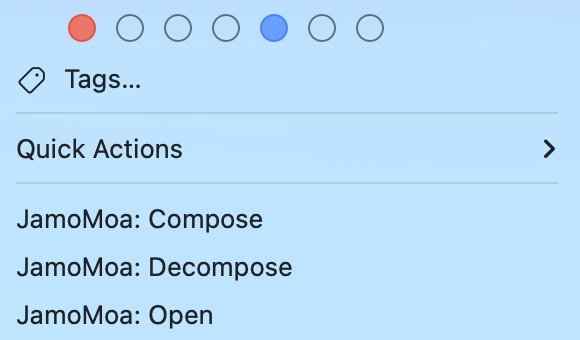
Compose and Decompose change only what you selected. Select a folder and only the folder’s name changes â its contents are left alone. To go deep, use JamoMoa: Open to put it on the review list, or the Include Folder Contents option of the Shortcuts actions below.
If the items don’t show up, launch the app once (that’s when macOS registers the services). Still missing? Check that they’re enabled under System Settings ⸠Keyboard ⸠Keyboard Shortcuts⦠⸠Services.
Results arrive as notifications
The immediate conversions (Compose / Decompose) don’t open a window, so the result comes as a Notification Center banner â what changed (e.g. ìë
íì¸ì.txt and 2 more) plus a summary (e.g. 3 composed, 1 failed).
- The app asks for notification permission once, at first launch. Decline and conversions still work â the banner is just quietly skipped.
- Tune it under Settings ⸠Notifications: the Enable notifications master switch with the Notify About section beneath it. When the macOS permission is denied a button jumps straight to System Settings; while it’s undecided a Request Permission⦠button appears.
- Show conversion result notifications can also live in the Quick Options bar (it’s only offered while the master switch is on).
Shortcuts
Four JamoMoa actions join the Shortcuts app. All of them run in the background, without opening the app window.
- Compose Files / Decompose Files â rename the given files and folders to NFC / NFD. Turn on Include Folder Contents to recurse into folders (off by default). They return the converted count and show a result summary as a dialog.
- Compose Text / Decompose Text â convert a string itself to NFC / NFD and hand it back. No files are touched.
A failing item (permissions, a name clash) never aborts the shortcut â failures are reported as counts, so an automation keeps flowing.